



Description
Download APK Installer on WSA – install APK, Android apps on Windows, WSA, Windows Subsystem for Android, APK installer tool, mobile app on PC
Overview
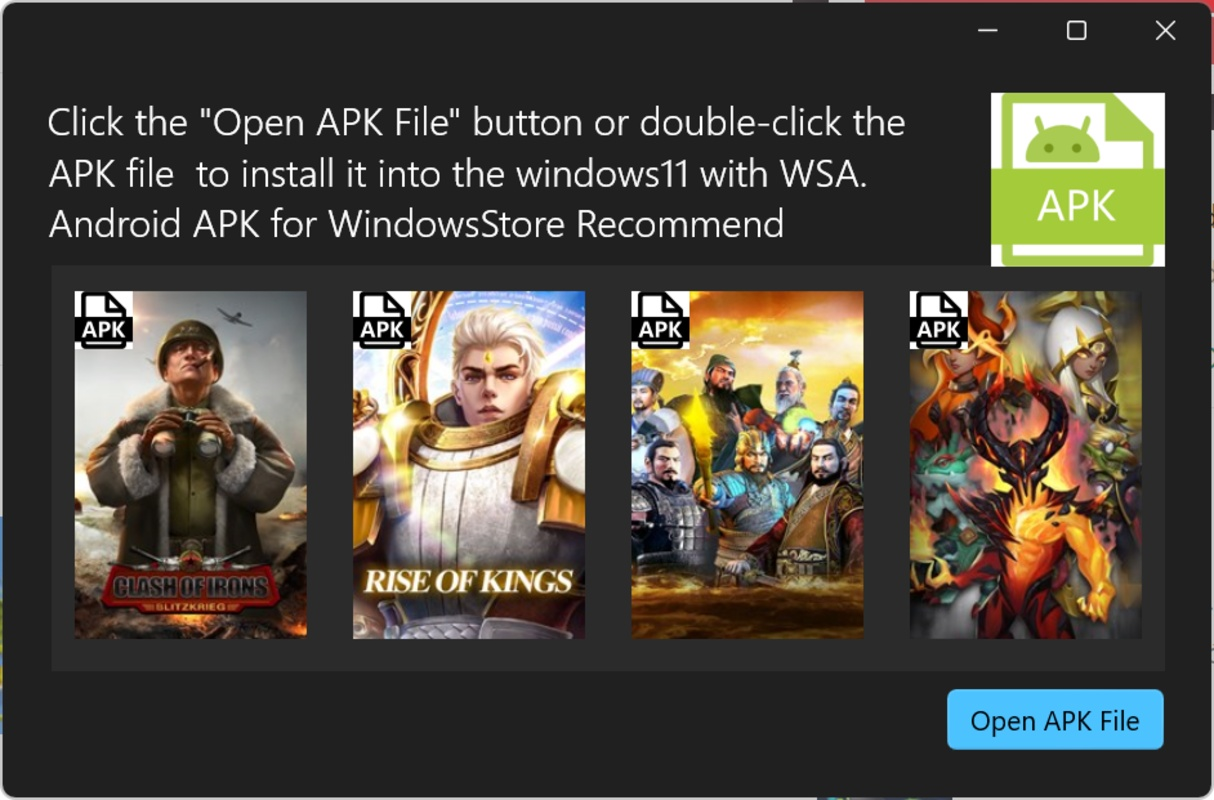
APK Installer on WSA is a specialized utility designed to simplify the installation of Android applications on Windows 11 through the Windows Subsystem for Android (WSA). This tool addresses a common technical barrier for users who wish to run Android apps on their PCs without navigating complex command-line procedures. By eliminating the need for manual ADB commands, it offers a streamlined, user-friendly experience that caters to both novice and experienced users. The app is particularly beneficial for individuals seeking to expand their productivity or entertainment options by accessing Android-based tools, games, or services directly from their Windows environment.
Target users include developers testing Android apps, power users looking to run specific Android tools, and general consumers who want to use mobile apps on larger screens. The app’s focus on integration with WSA positions it as a critical component in the growing ecosystem of cross-platform application usage. Although the developer did not provide additional background, the app’s clear purpose and focused functionality suggest a dedicated effort to enhance the WSA experience. Real-world use cases include installing niche productivity apps, accessing mobile-exclusive services, or running games not available natively on Windows. Its role in lowering the technical barrier to entry for WSA users underscores its importance in the current mobile-PC convergence landscape.
Key Features & Functionality
- Seamless APK Installation – Users can install APK files directly by opening them with APK Installer on WSA or launching the app and selecting the desired file. This eliminates the need for command-line input, making the process accessible to users without technical expertise.
- Integration with Third-Party Stores – While the app focuses on direct APK installation, it supports the use of third-party app stores like Uptodown. This allows users to discover and install additional Android apps without manually downloading and managing APK files.
- Developer Mode Access – The tool requires users to enable developer mode and access development options within WSA settings. This grants secure file transfer via ADB to the local IP address of the WSA instance, ensuring reliable communication between the host system and the Android environment.
- Automatic Updates – APK Installer on WSA automatically updates to the latest version, ensuring users benefit from new features, performance improvements, and security patches without manual intervention.
- Compatibility with Windows Subsystem for Android – The app is built specifically for WSA, guaranteeing full compatibility and smooth integration with Windows 11’s Android subsystem, which enhances reliability and reduces the risk of installation failures.
For example, a user can download a game APK from a trusted source, open it with APK Installer on WSA, and have it installed and launched within seconds. Similarly, a professional needing a mobile-only business tool can use the app to install it on their Windows PC for greater convenience. The automation of file transfer and installation significantly reduces friction in the workflow.
Interface, UX & Performance
The interface of APK Installer on WSA is designed with simplicity and functionality in mind. It features a clean, minimal layout that prioritizes core tasks—selecting and installing APK files—without unnecessary distractions. Navigation is intuitive, with a single-click workflow for file selection and installation. The app does not display complex settings or advanced options, reflecting its focused purpose.
Although the developer did not list formal performance metrics, the tool’s lightweight nature—only 3.2 MB in size—suggests efficient resource usage. It is expected to run smoothly on most modern Windows 11 systems, especially those with adequate RAM and storage. Responsiveness is likely to be high, given the app’s direct integration with WSA and reliance on built-in system services. Stability should be maintained through regular automatic updates, which help address potential bugs or compatibility issues over time.
Users should expect consistent performance across different device categories, though specific hardware benchmarks were not disclosed. The app’s reliance on the WSA framework means its behavior may vary slightly depending on system configuration, but no major stability concerns have been reported in the available information. Overall, the UX is optimized for ease of use, with minimal learning curve and immediate usability upon installation.
Platform Compatibility & Technical Requirements
APK Installer on WSA is designed exclusively for Windows 11, leveraging the capabilities of the Windows Subsystem for Android (WSA). The app is compatible with the latest version of WSA, ensuring seamless operation within the supported environment. It requires a system running Windows 11, though specific minimum OS requirements were not listed by the developer.
The application is lightweight, with a file size of 3.2 MB, making it suitable for devices with limited storage. It does not require high-end hardware to function, as it operates primarily through system-level integration rather than intensive processing. The app is available for free, with no in-app purchases or subscriptions. No additional permissions or system-level access beyond what is required by WSA were specified.
Compatibility information was not fully disclosed, but the app’s functionality is tightly coupled with WSA, meaning it will not operate on older Windows versions or non-WSA environments. Users should ensure their system meets the general requirements for WSA, including virtualization support and Windows 11 Pro or equivalent edition.
Pros and Cons
Pros
- Eliminates the need for ADB commands, simplifying APK installation
- Lightweight at only 3.2 MB in size
- Automatic updates ensure users always have the latest version
- Designed specifically for WSA, ensuring high compatibility
- Intuitive interface suitable for users of all skill levels
Cons
- Only compatible with Windows 11 and WSA, limiting broader use
- Requires enabling developer mode, which may deter some users
- No advanced customization options or batch installation features
- Dependent on WSA stability, which may vary across systems
- Developer did not provide detailed technical specifications or system requirements
FAQ
Is APK Installer on WSA safe to use?
The app is designed to work securely within the WSA framework and uses standard ADB connections. As long as users install APK files from trusted sources, the tool itself poses no known security risks.
Can I install APK Installer on WSA on older versions of Windows?
No. The app is specifically built for Windows 11 and requires the Windows Subsystem for Android, which is not available on older Windows versions.
Do I need to enable developer mode to use this app?
Yes. Developer mode must be enabled in the WSA settings to allow file transfer and installation via ADB, which is required for the app to function.
Does APK Installer on WSA support batch installation of multiple APKs?
Based on available information, the app supports one-file installation at a time. No batch processing features were listed.
How often does APK Installer on WSA update?
The app automatically updates to the latest version, ensuring users receive new features and improvements without manual intervention.
Final Thoughts
APK Installer on WSA stands out as a practical, no-frills solution for users seeking to run Android apps on their Windows 11 machines. Its focus on simplicity, integration with WSA, and automatic updates make it a reliable tool for both casual and technical users. While it lacks advanced features like batch installation or deep customization, its core functionality is executed efficiently and securely. The app is ideal for anyone who wants to install a specific Android app without diving into command-line tools. For users already invested in the WSA ecosystem, this tool removes a significant barrier to entry.
Its lightweight design, free availability, and seamless workflow position it as a must-have utility for enhancing the Android-on-PC experience. Whether you're testing an app, playing a mobile game, or using a mobile-only productivity tool, APK Installer on WSA delivers value with minimal overhead.
Download APK Installer on WSA now
Guides & Tutorials for APK Installer on WSA
How to install APK Installer on WSA
- Click the Preview / Download button above.
- Once redirected, accept the terms and click Install.
- Wait for the APK Installer on WSA download to finish on your device.
How to use APK Installer on WSA
This software is primarily used for its core features described above. Open the app after installation to explore its capabilities.
User Reviews for APK Installer on WSA 0
No reviews found


